Loading
Skip to content
Contact Us
  • Products

    FDM 3D Printers

    Snowflake
    Julia
    Dragon
    Twin dragon
    Volterra

    SLS 3D Printer & Accessories

    Apollo 250
    MDS-1
    Printstick

    FDM 3D Printers

  • Manufacturing Services

    3D printing Services

    FDM 3D Printing

    SLS 3D Printing

    HPMJF 3D Printing

    SLA Printing

    Vaccum Casting

    Jigs & Fixtures

    Prototyping

    Healthcare

    Engineering Services

    Designing Services

    Finishing Assembly

    Consulting Services

    Reverse Engineering

    Quality Assurance

  • Industries
    • Automobile
    • Engineering
    • Healthcare
    • Manufacturing
    • Entertainment
    • Jewelry
    • Dental
    • Medical
  • Materials
    • PLA
    • ABS
    • PET-G
    • PVA
    • Nylon
    • CF Nylon
    • PC
    • TPU
  • Resources
    • Knowledge Base
    • Blogs
    • CSR
    • Events & News
    • Download Fracktory
    • Careers
    • FAQs
    • Our Partners
  • Support
  • About Us
  • Products

    FDM 3D Printers

    Snowflake
    Julia
    Dragon
    Twin dragon
    Volterra

    SLS 3D Printer & Accessories

    Apollo 250
    MDS-1
    Printstick
  • Manufacturing Services

    3D printing Services

    FDM 3D Printing

    SLS 3D Printing

    HPMJF 3D Printing

    SLA Printing

    Vaccum Casting

    Jigs & Fixtures

    Prototyping

    Healthcare

    Engineering Services

    Designing Services

    Finishing and Assembly

    Consulting Services

    Reverse Engineering

    Quality Assurance

  • Industries
    Automobile

    Automobile

    Engineering

    Healthcare

    Healthcare

    Manufacturing

    Entertainment

    Jewellery

    Dental

    Medical

  • Materials
    Article_PLA_Cover-1280x720

    PLA

    3D Print plastic (2)

    ABS

    petg-clear-filament-vases-43274b58ee202ec1db6679362cd9ee10-scaled.jpg

    PET-G

    Untitled design (1)

    PVA

    Fusion3-3D-printed-Nylon-Gears-6

    Nylon

    Carbon-Fiber-prints-hero

    CF Nylon

    PC_airwolf

    PC

    Screenshot-2025-06-02-143932.jpg

    TPU

  • Resources
    2

    Knowledge Base

    3

    Blogs

    4

    CSR

    5

    Events & News

    6

    Download Fracktory

    7

    Careers

    8

    FAQ's

    9

    Our Partners

  • Support
  • About Us
  • Products

    FDM 3D Printers

    Snowflake
    Julia
    Dragon
    Twin dragon
    Volterra

    SLS 3D Printer & Accessories

    Apollo 250
    MDS-1
    Printstick
  • Manufacturing Services

    3D printing Services

    FDM 3D Printing

    SLS 3D Printing

    HPMJF 3D Printing

    SLA Printing

    Vaccum Casting

    Jigs & Fixtures

    Prototyping

    Healthcare

    Engineering Services

    Designing Services

    Finishing and Assembly

    Consulting Services

    Reverse Engineering

    Quality Assurance

  • Industries
    • Automobile
    • Engineering
    • Healthcare
    • Manufacturing
    • Entertainment
    • Jewelry
    • Dental
    • Medical
  • Materials
    • PLA
    • ABS
    • PET-G
    • PVA
    • Nylon
    • CF Nylon
    • PC
    • TPU
  • Resources
    • Knowledge Base
    • Blogs
    • CSR
    • Events & News
    • Download Fracktory
    • Careers
    • FAQs
    • Our Partners
  • Support
  • About Us
Contact Us
  • Products

    FDM 3D Printers

    Snowflake
    Julia
    Dragon
    Twin dragon
    Volterra

    SLS 3D Printer & Accessories

    Apollo 250
    MDS-1
    Printstick
  • Manufacturing Services

    3D printing Services

    FDM 3D Printing

    SLS 3D Printing

    HPMJF 3D Printing

    SLA Printing

    Vaccum Casting

    Jigs & Fixtures

    Prototyping

    Healthcare

    Engineering Services

    Designing Services

    Finishing and Assembly

    Consulting Services

    Reverse Engineering

    Quality Assurance

  • Industries
    Automobile

    Automobile

    Engineering

    Healthcare

    Healthcare

    Manufacturing

    Entertainment

    Jewellery

    Dental

    Medical

  • Materials
    Article_PLA_Cover-1280x720

    PLA

    3D Print plastic (2)

    ABS

    petg-clear-filament-vases-43274b58ee202ec1db6679362cd9ee10-scaled.jpg

    PET-G

    Untitled design (1)

    PVA

    Fusion3-3D-printed-Nylon-Gears-6

    Nylon

    Carbon-Fiber-prints-hero

    CF Nylon

    PC_airwolf

    PC

    Screenshot-2025-06-02-143932.jpg

    TPU

  • Resources
    2

    Knowledge Base

    3

    Blogs

    4

    CSR

    5

    Events & News

    6

    Download Fracktory

    7

    Careers

    8

    FAQ's

    9

    Our Partners

  • Support
  • About Us
+916364925434
Contact Us

3D Printers

90
  • Julia 200/250
    • TEST
  • Julia Series
    • Board Driver jumper settings.
    • How to make complete use of your accessories box.
    • Changing Material/ filament.
    • Removing carriage board – Julia Extended.
    • Julia Extended and Intermediate User Manual (2018)
    • Small size print failure
    • Layer Shifting caused by pulley slipping down
    • The printer does not turn on
    • Min Temp error.
    • Thermal Runway, System Stopped Error
    • Error: Heating failed, system stopped! Heater_ID: Bed
    • Troubleshooting Limit switch issues.
    • Changing SMPS- Extended.
    • SMPS not turning ON
    • How to identify burnt green connectors/ screw terminal?
    • SOP of the printer
    • Replacing Nozzle PTFE
    • Julia Setup And Installation
      • Removing carriage board – Julia Extended.
      • Using TMC 2209/2208 drivers with MKS 1.4 for Julia Extended Non ABL.
      • Changing Material/ filament.
      • How to make complete use of your accessories box.
      • Board Driver jumper settings.
    • Troubleshooting
      • How to identify burnt green connectors/ screw terminal?
      • SMPS not turning ON
      • Changing SMPS- Extended.
      • Troubleshooting Limit switch issues.
      • Error: Heating failed, system stopped! Heater_ID: Bed
      • Thermal Runway, System Stopped Error
      • Min Temp error.
      • The printer does not turn on
      • Layer Shifting caused by pulley slipping down
      • Small size print failure
    • Manuals & Downloads
      • Julia Extended and Intermediate User Manual (2018)
    • Maintenance
      • SOP of the printer
      • Replacing Nozzle PTFE
  • Snowflake
    • Firmware & Display Setup Guide
    • Mechanical Assembly & Inspection Manual
    • Site Setup & Electrical/Network Guide
    • SOP of the printer
    • Snowflake User Manual.
    • How to make complete use of your accessories box.
    • Pre-Installation Requirements
    • Unboxing & Inventory Guide
    • Setup And Installation
      • Firmware & Display Setup Guide
      • Mechanical Assembly & Inspection Manual
      • Site Setup & Electrical/Network Guide
      • How to make complete use of your accessories box.
      • Pre-Installation Requirements
      • Unboxing & Inventory Guide
    • Manuals & Downloads
      • Snowflake User Manual.
    • Maintenance
      • SOP of the printer
  • Twin Dragon
    • Fracktory Slicer
  • Julia Pro
    • Replacing Nozzle PTFE
    • Layer Shifting caused by pulley slipping down
    • Julia Pro User Manual
    • SOP of the printer
    • Changing Material/ filament.
    • How to make complete use of your accessories box.
    • Julia Pro Setup And Installation
      • SOP of the printer
      • Changing Material/ filament.
      • How to make complete use of your accessories box.
    • Manuals & Downloads
      • Julia Pro User Manual
    • Troubleshooting
      • Replacing Nozzle PTFE
      • Layer Shifting caused by pulley slipping down
  • Volterra
    • E1 extrusion issue
    • Layer Shifting caused by pulley slipping down
    • Layer shifting/ Print quality drop due to damaged belt.
    • SOP of the printer
    • Replacing Nozzle PTFE
    • Changing Material/ filament.
    • Filament sensor not working.
    • How to make complete use of your accessories box.
    • Setup And Installation
      • SOP of the printer
      • Replacing Nozzle PTFE
      • Changing Material/ filament.
      • Filament sensor not working.
      • How to make complete use of your accessories box.
    • Troubleshooting
      • E1 extrusion issue
      • Layer Shifting caused by pulley slipping down
      • Layer shifting/ Print quality drop due to damaged belt.
  • 3D Printing
    • Buying a 3D printer.
    • Taxation in the 3D Printing Industry (FDM only :)
    • Applications of 3D printing
    • What is 3D printing.
    • Design for For FFF
    • Design for FFF/FDM 3D Prirning
      • Design for For FFF
    • What is 3D printing.
      • What is 3D printing.
    • Buying a 3D Printer
      • Buying a 3D printer.
      • Taxation in the 3D Printing Industry (FDM only :)

Software

7
  • Fracktory Slicer
    • Sending Gcode to Fracktal care for troubleshooting.
    • Tuning material settings on Fracktory.
    • Getting started with Fractory.
    • Fracktory Slicer
    • Getting Started
      • Getting started with Fractory.
    • Print Settings
      • Tuning material settings on Fracktory.
    • Tips & Troubleshooting
      • Sending Gcode to Fracktal care for troubleshooting.

Material & Filaments

20
  • About: Carbon Fiber Nylon/CF-PA, A brief introduction.
  • About: Nylon, A brief introduction.
  • About: PVA, A brief introduction.
  • About: ABS, A brief introduction.
  • About: PET-G, A brief introduction.
  • About: TPU, A brief introduction.
  • About: PLA, A brief introduction.
  • Mechanical Properties of PLA
  • Material (filament) storage SOP
  • FDM 3D prining materials.
  • 3D Printing Material Guides
    • Material (filament) storage SOP
    • FDM 3D prining materials.
  • PLA/PLA+
    • About: PLA, A brief introduction.
    • Mechanical Properties of PLA
  • TPU
    • About: TPU, A brief introduction.
  • PET-G
    • About: PET-G, A brief introduction.
  • ABS
    • About: ABS, A brief introduction.
  • PVA
    • About: PVA, A brief introduction.
  • Nylon/PA
    • About: Nylon, A brief introduction.
  • Carbon Fiber Nylon/CF-PA
    • About: Carbon Fiber Nylon/CF-PA, A brief introduction.

Print Troubleshooting Guide

5
  • Stringing or Oozing
  • 3D TroubleShooting and Problem
  • Problems with the print quality of the model
  • Blocked nozzle.
  • Filament extrusion is not proper in the first layer.

Miscellaneous

13
  • Build plate related issues
  • Accessories & Spares!
  • Answering your first ticket.
  • While we are assigning a service agent to attend to your query…
  • Nylon with Julia+
  • Service Report
  • Bed Levelling Knob holder – 3D Printable part
  • Hotend Assembly
  • Fracktory software, User manual and Quick start Video
  • Software Update procedure for Wifi connected Julia Series
  • USB Setup guide
  • Manual for Julia 2018 Series
  • How to identify the diameter of the nozzle

Internal Documentation

9
  • Installing servo encoder to Motors
  • How to check for electrical connectivity issues in 3D printers.
  • How to load code to Seeeduino Xiao (Snowflake bed levelling code loading)
  • Hotend electrical diagnosis.
  • Motor Driver error due to faulty jumper.
  • Julia pro touch UI- Not connecting to MKS
  • Always on cooling fan not working.
  • How to load code to Arduino (usually bed levelling code in Fracktal)
  • How to pull Github code
View Categories
  • Home
  • Knowledge Base
  • Material & Filaments
  • 3D Printing Material Guides
  • Material (filament) storage SOP

Material (filament) storage SOP

6 min read

3D printing filaments are hygroscopic in nature. PLA, Nylon, and PVA are extremely hygroscopic, and storing them in air-tight containers with dessicants is a must. Other filaments also need to be stored in air air-tight container, but can be exposed to atmospheric air for a short duration, but should not be left in the open for a long time.
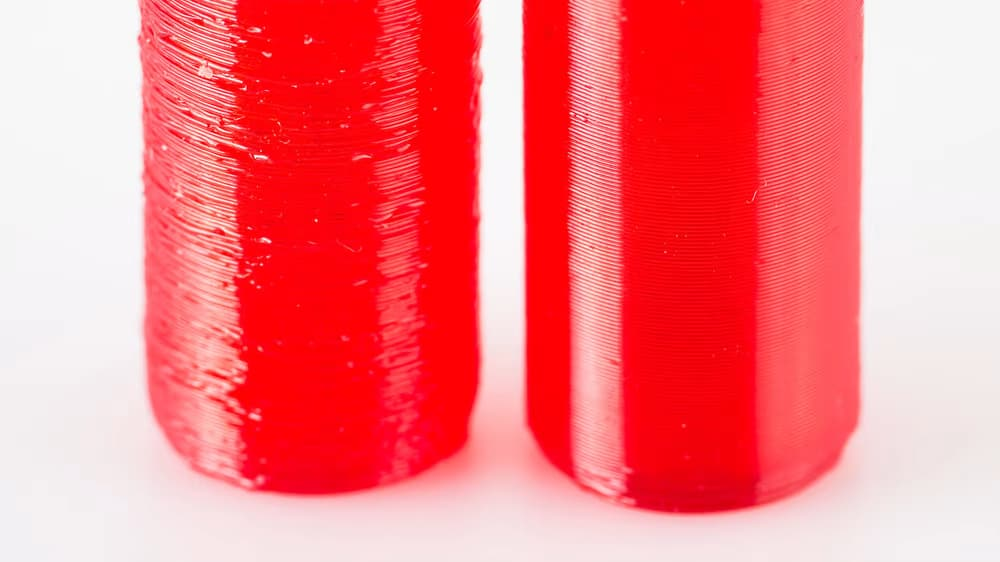
See the difference in printing with wet (left) vs. dry filament (right) (Source: Thrinter)

The majority of materials used in FDM 3D printing can be considered hygroscopic, meaning that they absorb water molecules rather than repel them. This doesn’t mean that your Benchy will act like a sponge, but if you let your filament sit out in the open air on a humid day, your print quality will go down. Even what we might consider relatively low ambient humidity can be detrimental to filament through cumulative exposure. Keeping filament in an airtight container is a must to prevent the absorption of humidity from the air, and the use of vacuum-sealed containers or ones with desiccant is even better. We’ll go into more detail about desiccants in a moment, but first, let’s look at the warning signs.

Knowing if Your Filament Is Wet

Can you guess which print was done with dry filament?
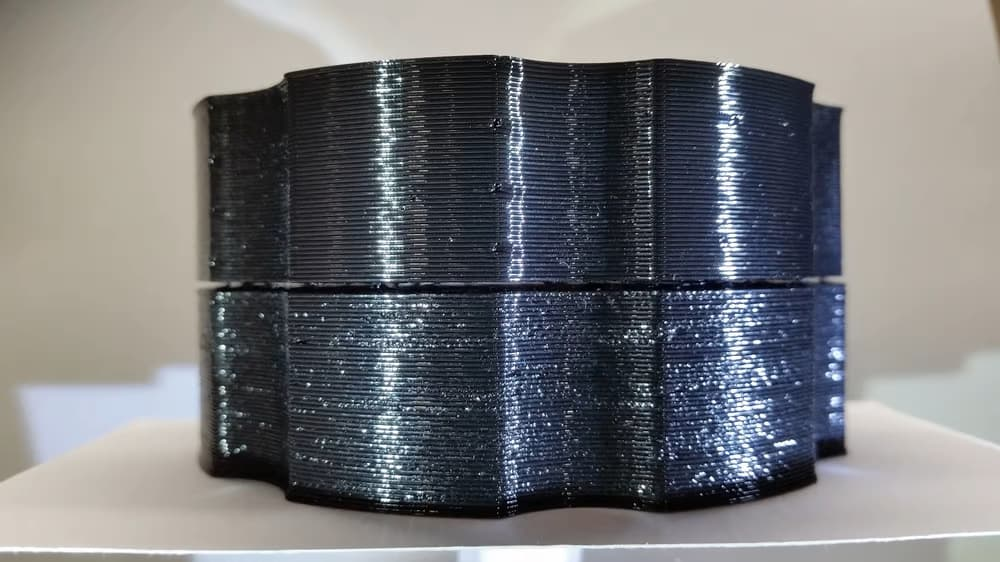
(Source: bobstro via Prusa Research Forum)

With “wet” filament, you might notice print surface quality getting worse or poorer layer adhesion. One way to tell if the filament is too wet is to listen for popping or crackling sounds when it’s being melted in the hot end. What you’re hearing is the sound of water boiling out of the filament and evaporating.

That said, wet filament isn’t a lost cause, as most filaments can be dried using a repurposed food dehydrator, a low-temperature oven, or a purpose-built machine such as some of the ones included at the end of this list.

Necessity of Storage

Naturally, dust and particulates settle on spools of filament when they’re left out in the open. These tiny nuisances can lead to decreased print quality, even clogging the nozzle during printing.

Cleaning and changing nozzles can be a pain, so preventing the dust from getting on the filament in the first place is an easy choice. This can be accomplished by simply storing the filament in closed containers or places otherwise secluded from airborne particulates. Another line of prevention is the use of a dust filter that the filament slides through during the printing process, which wipes away any potential contaminants before they reach the hot end.

3D PRINTER FILAMENT STORAGE / HOW TO STORE FILAMENT (PLA & MORE)

A Note on Desiccants

Desiccants are usually made from silica gel beads
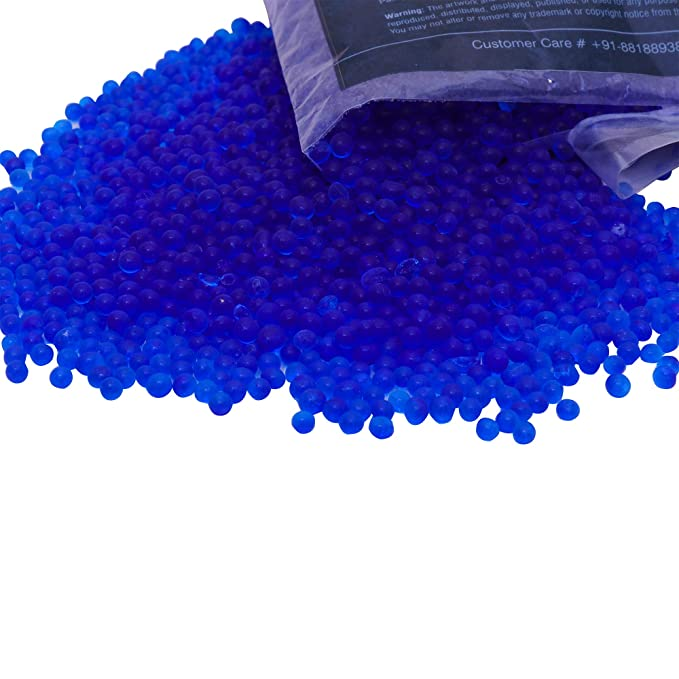
(Source: Amazon)

Many of the filament storage solutions on this list require the use of desiccants. A desiccant is something that is so hygroscopic that it’ll preferentially absorb all of the ambient moisture in a space. Desiccants are most commonly found in small pouches, but can also be purchased as beads.

Packets are the most common form of desiccants. They’re convenient, inexpensive, and available in many different sizes from 0.5 to 500 grams.

With disposable desiccants aside, the vast majority of beads and packets can be “recharged.” This is accomplished by baking the desiccant at a very low temperature in an oven, a food dehydrator, or even a microwave. When the desiccant becomes saturated, simply recharge it by baking out all the excess moisture, and you’ll be good to go. Keep in mind that the more desiccant you have in a given container, the less often you’ll have to recharge it.

Color-Indicating

Most desiccant on the market offers a color-indicating feature. This means that as the desiccant becomes saturated with water, the color will gradually transition from, say, blue to orange or orange to green, depending on the desiccant. This feature is available with both packets and beads, although sometimes it can be hard to see the color change through the fabric of the packet.

How Much Is Needed

While it’ll never hurt to err on the side of caution when it comes to desiccants, there’s a formula for how much desiccant is required for any given volume of air: Find the volume of your container in cubic feet and multiply it by 1.2. This will give you the number of units of desiccant you’ll need for that container.

Vacuum Bags

Filaments supplied by Fracktal come in a vacuum-sealed cover. But once opened, you will have to store it in an air-tight container. 

There are many storage solutions available for your filaments, but a significant proportion are either expensive, impractical, or too time-consuming. To keep things simple and cost-effective, you can buy vacuum bags. High-quality vacuum bags provide an air-free environment for your filaments. You’ll want to purchase bags that have a vacuum valve for sucking the air out. Additionally, you’ll need to go for bags with a double-zipper mechanism for maximum impermeability to air. To make sure even the slightest moisture is removed, we need to place silica gel bags inside.

Make sure the filament is locked into the spool holder because sharp filament edges can poke a hole into vacuum tubes. Filaments supplied by Fracktal come in an air-tight packet

Dry Box

Another great solution to creating a moisture-free environment for filament storage is a dry box. These cabinets provide the kind of low-humidity environment that is perfect for filament storage. The technology works through an electronic dehumidifier system that constantly dehumidifies the interior of the box. As a result, you’ll limit the contact that your filament has with humid air to practically nothing. For you, this means stronger, more reliable prints. You can Google dry box to find a suitable dry box to purchase.

Storage Boxes
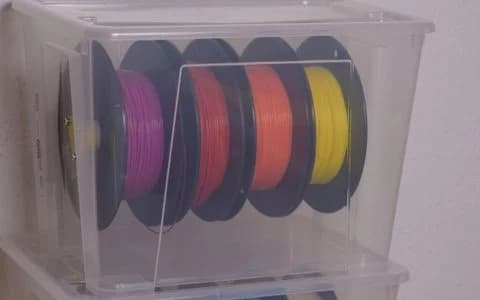
Transparent storage boxes with sealed lids present another great way to store your 3d printing filaments correctly. The idea behind the sealed lids is that no new moisture can reach the filament from outside. The need for transparency arises from a practical perspective. If you cannot see inside the boxes, you’ll never know what filament is inside which boxes.

In terms of size, you’ll want to aim for something big enough to stack a few spools of at least 20 cm in diameter. A good base size to aim for is something of roughly 40 cm in length and 30 cm in width. The height depends on how many filament spools you plan to stack, but around 40 cm should be fine.

Dehumidifiers

The one issue with storage boxes is the need to reduce the humidity of the air that remains inside the box once you place the filament in it. To solve this conundrum, you can purchase a dehumidifier. One could forgive you for thinking that this solution already lacks practicality. But fret not; dehumidifiers require no batteries or cords to operate. And they are completely renewable. In other words, they are the very definition of practical.

If you want to get fancy, or you’re having trouble checking what color the beads are on your dehumidifier, you can purchase some humidity indicator cards. Ultimately, this step is not necessary, but it can be helpful for easily gauging the humidity level. Simply place the cards inside your box and you’re all set.

Oven-Drying

To dry your filament, you can use that all-around useful appliance–the household oven. More specifically, you’ll need a fan oven because this kind of oven distributes air evenly throughout the interior. The even flow of air means that warm air constantly circulates the spool.

A crucial factor to consider when deciding whether your filament is suitable for oven-drying is the Glass Transition Temperature (Tg) of the material. This is the temperature region where the polymer changes from a hard, glassy material to a soft, rubbery material.

PLA, for example, has a Tg of just 60 degrees Celsius, making it unsuitable for oven-drying unless your oven doesn’t have a minimum heat setting. On the contrary, other filament types like ABS have a Tg of 100 degrees. The important thing if you decide to dry any filament is to research that filament’s glass transition temperature. If it’s around 80 degrees or higher, it should be fine in there for an hour at 60-70 degrees. If the Tg is less than 80 degrees Celsius, you can try to dry the filament at a lower temperature of around 30-40 degrees Celsius, but perhaps leave it in there for longer.

Updated on November 19, 2025
3D Printing Material Guides Material & Filaments

What are your Feelings

  • Happy
  • Normal
  • Sad

Share This Article :

  • Facebook
  • X
  • LinkedIn
  • Pinterest

Leave a Reply Cancel reply

Your email address will not be published. Required fields are marked *

Information

About Us

Contact Us

Our Partners

Careers

Products

Snowflake

Julia

Dragon

Twin Dragon

Volterra

Material Dryer

Printstick

Apollo SLS

Solutions

3D Printing Services

Engneering Services

Support

Knowledge Base

Raise an Issue

Legal

EULA

Terms & Conditions

Privacy Policy

Cookie Policy

Return & Refund Policy

Shipping Policy

© 2025 Fracktal Works Pvt. Ltd

Facebook Twitter Youtube Instagram Linkedin